Picking the right web design software starts with knowing what you really need it for. Are you setting up a snazzy personal blog, launching a full-scale online shop, or perhaps putting together a portfolio to show off your work? Each use case might steer you toward different tools, so identifying your primary goal is step one.
Are you building a website that works for your goals, or are you trying to adapt to a tool that wasn’t built for your needs?
What’s the wish list for your website? Is it about having a slick user interface or loading it up with interactive features? Maybe it’s a built-in eCommerce platform or solid SEO tools to help you rank higher on Google. Jotting down these must-haves helps in filtering software options later on.
Now, who’s your audience? Your website’s design has to vibe with the folks visiting it. A flashy, colorful design might catch the eye of younger users, while a more professional, subdued look might suit a business-focused audience. Understanding these preferences is crucial in narrowing down your choices.
Assessing your technical finesse is not to be overlooked. If coding sounds more daunting than deciphering hieroglyphics, then drag-and-drop builders might be your jam. On the flip side, if you’re cool with some coding challenges, platforms offering code access could give you the extra control you’re craving.
Lastly, never forget about mobile! With nearly everyone glued to their smartphones, having a site that’s mobile-responsive isn’t just a nice-to-have—it’s critical. An adaptable design ensures your site looks sharp on screens large and small. Plus, good SEO integration is key for boosting your site’s visibility on those ever-important search results.
Exploring Popular Web Design Platforms
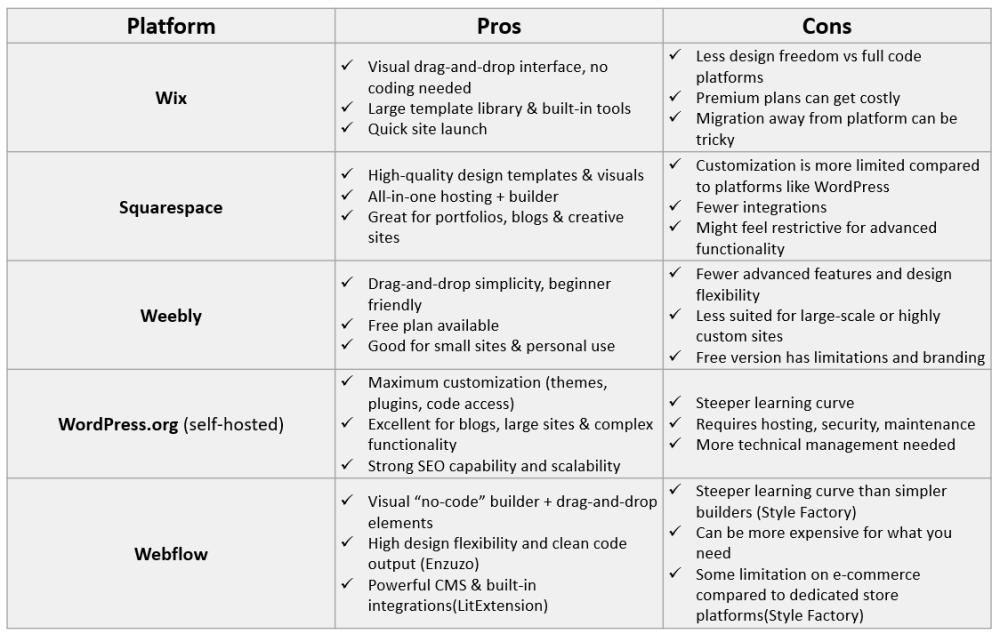
Picking the right platform can feel like choosing between a rock star lineup. Each has its own vibes and strengths. Wix, WordPress, Squarespace—ring any bells? They’re all heavy hitters in the web design arena, offering unique features that cater to different needs.
The debate between drag-and-drop builders and code-based platforms is a biggie.
- Drag-and-drop is all about ease—perfect for those who want to build cool sites without deep-diving into code. They’re great if you value speed and simplicity.
- Code-based tools, meanwhile, hand the reins to you for ultimate customization, but they come with a steeper learning curve.
Keep an eye on pricing structures. Some platforms might seem affordable upfront but could sneak in extra costs with premium templates or additional features. Understanding the full payment picture saves you from nasty surprises down the line.
Feature sets—oh, they vary wildly! Templates, plugins, and integrations are the nuts and bolts of any platform. Some offer rich template libraries and integrate seamlessly with third-party tools for analytics, email marketing, or social media, while others might confine you to their ecosystem.
Don’t skip on checking out user reviews and stories. Real-world experiences can shed light on what platforms are like beyond the glossy sales pitches. Reading about how similar businesses or bloggers fared could help steer you to the right choice.
Evaluating User Experience and Design Flexibility
User experience can make or break your website, especially when you’re just getting started with design. If navigating the software feels like solving a puzzle without a cheat sheet, it’s probably not the right pick for you. Look for platforms boasting intuitive interfaces that let you breeze through design tasks without breaking a sweat.

Design flexibility is crucial if you’ve got a specific vision in mind. Whether it’s about tweaking layouts or picking the perfect color combos, a platform that offers deep customization can be a real game-changer. This flexibility ensures your site looks exactly how you envisioned it, from jaw-dropping visuals to functional navigation.
Let’s talk aesthetics and typefaces. These elements do more than just pretty-up your site; they shape the first impression visitors will take away. Crisp visuals paired with easy-to-read fonts go a long way in hooking your audience from the get-go. It’s worth exploring the platform’s library to see what’s on offer and if it can deliver the look you crave.
Cross-platform compatibility is another biggie. Your site should have an excellent performance on desktop, tablet, and mobile. This flexibility ensures a smooth user experience across all devices, which is pretty much expected these days. Accessibility is also key—consider tools that let you cater to users with disabilities.
Be mindful of the potential limitations some free or basic versions might have. They often come with restrictions on features that can bottleneck your creativity or growth. It’s a balancing act between finding a tool that fits your current needs and one that can grow with you, offering premium features when you’re ready to take things up a notch.
Balancing Cost with Functionality and Support
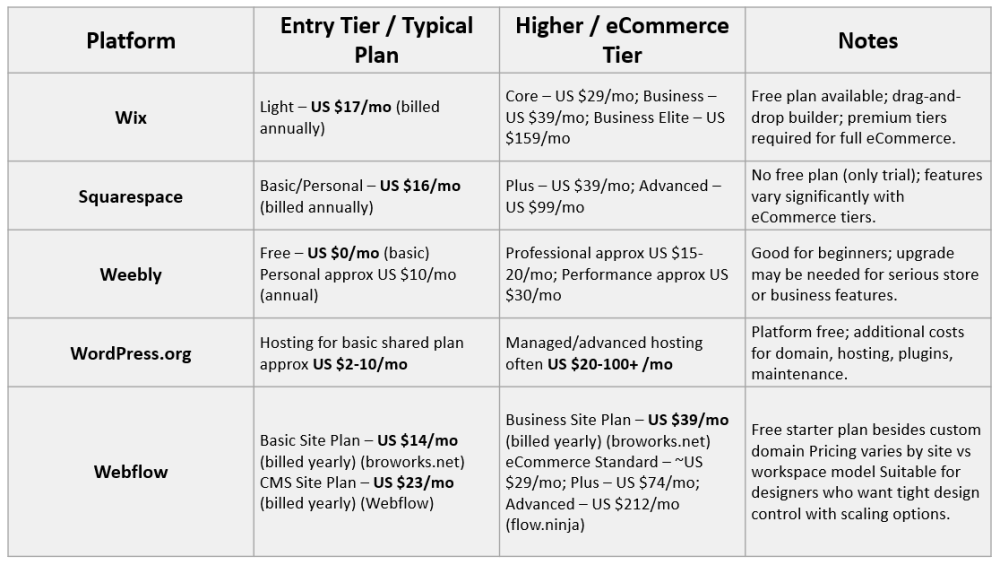
Navigating the world of web design software pricing can feel like trying to read the small print on a contract. Costs aren’t just about the sticker price. You gotta look at the subscription packages and what they really offer. Some platforms might start cheap but ramp up quickly as you need more features or bandwidth.
NB: The pricings in the table below are the current pricing, however, they might change anytime, and if that happens then I will update the table.
Technical support is like that friend who’s always got your back when things get tricky. A platform that offers solid customer service or a supportive community can make all the difference when you’re knee-deep in the design process and hit a roadblock.
Long-term costs sneak up when you least expect them—like maintaining the website or scaling it to add new features. Plan ahead so you don’t find yourself locked into a platform that’s milking your budget every time you need an upgrade or maintenance check.
Initial costs can sometimes feel like a sucker punch, but what really tips the scales is what you gain in the long run. Platforms with high upfront costs might offer extensive features that pay off by saving time or enhancing your website’s capabilities down the road.
Consider the stories of others who have walked this path before. Case studies can offer great insights into how others have managed their finances while getting the best out of their web design software. Balancing functionality with your budget might take some juggling, but hearing how others have mastered it can offer a masterclass in planning.
Sealing Your Decision: What Comes Next
Now that you’ve got your eye on a few web design platforms, it’s time to take them for a spin. Many offer free trials, letting you test drive the features you’re interested in without dropping a dime. A checklist of must-have features can really help you stay focused during this trial period.
Setting realistic timelines can save you from burning out. Putting in the time upfront to learn the ins and outs of your chosen software is invaluable, but don’t rush it! Establish a schedule that lets you grasp new skills thoroughly while keeping the excitement alive.
Once you’re on track with your web design journey, dive into training resources and communities. Whether you’re exploring forums, attending webinars, or reading up on best practices, there’s a ton out there to help you refine your skills and stay updated with the latest and greatest.
Your website should be as dynamic as your business plans. Consider how your design choices now might impact your ability to scale or pivot later. Future-proofing your site by choosing platforms that offer easy updates and scalable features can save major headaches down the line.
As you wrap up this journey, remember: your web design tool is a piece of a larger puzzle. Choose one that not only serves your current needs but evolves with you. This way, you’ll always have an online presence that truly represents what you’re about and where you’re headed.
Conclusion
Choosing the right web design platform isn’t just about picking the most popular name—it’s about finding the tool that aligns with your purpose, your skills, and your long-term goals. Whether you need the simplicity of drag-and-drop builders like Wix, Squarespace, and Weebly, the power and flexibility of WordPress, or the advanced design control of Webflow, the key is understanding what matters most for your website and your audience.
Take your time to explore real-world examples, test platforms through free trials, and evaluate how each option handles design freedom, functionality, costs, and scalability. In the end, the best platform is the one that helps you build confidently today and grow easily tomorrow. Your website is your digital home—so choose a foundation that supports your vision and future success.
Which platform are you leaning towards for your website—and what feature matters most to you (ease of use, customization, or price)?
Share your thoughts in the comments below — I’d love to hear what you’re building!